DBGTN.com Version 8.0
Members Login:
Username:
Password:
[ Forgot Password? - Register ]
Latest Additions:
Check out
the latest
DBGTN RPG
screen shots here.
Site Features:
 - DBGTN MMORPG
 - DBGTN Membership
 - DBGTN Mini Board
 - DBGTN Store
 - The Community
 15 Users online
 Total Members
 Registered: 5410
 Members Online: 5
 Member Stats
 Your User ID#:
 209.237.238.175
 · Navigation Menu
 - Current News
 - General Info.
 - Dragon Ball
 - Dragon Ball Z
 - Dragon Ball GT
 - Multimedia
 - Interaction
 - Fan Files
 - Humor
 - Webmasters
 - The Community

 · The U.S. of A.


 · Random Pic


[ Cels : Images ]


 · DBGTN Friends
 - DB Menace
 - DB-Unlimited
 - DBZGT Legacy
 - DBZ Network
 - Kame-House
 - Kiji-Anime
 - SaiyanChronicles
 - The Cell Game
 - The Saiyan Elite

The Forum Elite

 · DBGT NETWORK

Tutorials: Adobe Photoshop: Fire Effect

Note: all image sizes are 80X80 Pixels to fit the page click the image for a larger view.

Tutorials: Adobe Photoshop: Fire

Make a new document what ever size then press D to straighten up your colors.

Go to Filter>Render>Clouds...

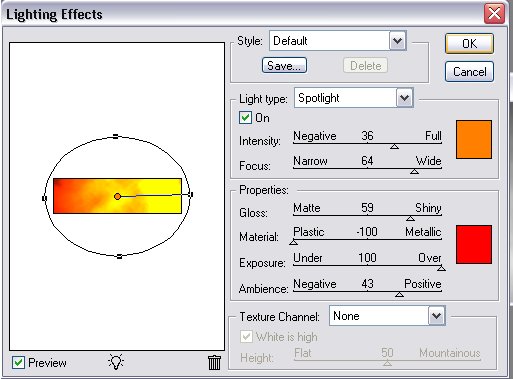
Now Go to Filter>Render>Lighting Effects... Set the Style to Default and set the Light Type to SpotLight and make sure the On box is checked. Set Intensity to 36 and set Focus to 64. Now next to the settings for that area you see a white box click the white box and a color box should pop-up, at the bottem it syas # set that to FF7F00 Now under Properties set Gloss to 59 also set Material to -100 (Negative 100) Set Exposure to 100 and last set Ambience to 43. Also above it you will see another white box/color box click it once the color box pops up go to the bottemw ere it says # and type in FF0000. Make sure Texture Channel is set to None. Now click OK.

Your Image should look like something like that.

Now add some effects and text you should get something like I did.

Note: all image sizes are 80X80 Pixels to fit the page click the image for a larger view.


 · View Layout..?

 · Voting Poll
What song should Virus for his next video?
Linkin Park - Faint
POD - The Messenjah
Audio Slave - Like a Stone
Slipknot - Purity


[ View results ]
[ Previous polls ]


 · Product Spotlight


Dragon Ball Z:Kid Buu - Regression DVD
Price: $18.71
[ - BUY NOW! - ]
Browse Catalog


[ Home - Staff Login - FAQs - Link Us - Contact - Privacy Policy - Terms of Use - Copyright - Viewing - Statistics ]

Dragon Ball, Dragon Ball Z, and Dragon Ball GT © 2002 BIRD STUDIO/ SHUEISHA, TOEI ANIMATION. Licensed by FUNimation® Productions, Ltd. All Rights Reserved. Dragon Ball, Dragon Ball Z, and Dragon Ball GT and all logos, character names and distinctive likenesses thereof are trademarks of TOEI ANIMATION. All information on this web site is solely for DBGTN.com unless otherwise stated. Not to be mistaken for the official site, DBGTN.com is strictly a fan site where by no infringement is intended.
Parsed In: 0.502 seconds using 5 Queries | Server Uptime: 3 weeks, 6 days, 11 hours, 11 minutes | Server Load: 1.48, 1.18, 1.12